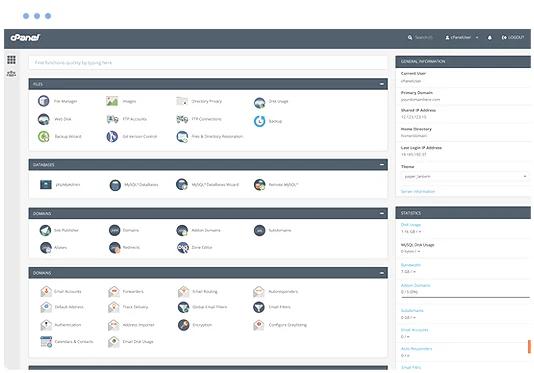
cPanel hosting control panel

What is WooCommerce?

WooCommerce is a free, open-source plugin that turns WordPress into a fully featured online store. It handles everything from your product catalogue to the cart, checkout, payments, shipping, tax and order management, all inside the WordPress dashboard you may already know.

Because WooCommerce is built on WordPress, your store and your content live side by side. You can write blog posts and landing pages that link straight to products, use WordPress themes to design your shop, and add features from thousands of WooCommerce extensions, such as bookings, subscriptions, memberships and product add-ons. If you would rather have a standalone shop than a website with a store, PrestaShop and OpenCart are also available in Softaculous.

WooCommerce features

What you get when you run WooCommerce on Hoopla Hosting.

Any kind of product

Sell physical goods, digital downloads, services and variable products with options such as size and colour, plus grouped and affiliate products.

Payments

Take card payments with gateways such as Stripe and PayPal, and add New Zealand providers such as Windcave with their WooCommerce extensions.

Tax and GST

Set up tax rates for New Zealand GST and choose whether prices are shown including or excluding tax.

Shipping zones and rates

Create shipping zones, such as North Island, South Island and international, with flat rates, free shipping thresholds or local pickup.

Orders, stock and customers

Manage orders, refunds, stock levels and customer accounts from one dashboard, with sales analytics built in.

Extensions and themes

Add subscriptions, bookings, memberships, product feeds and more from thousands of free and paid extensions.

What can you build with WooCommerce?

Small and growing retailers

Shops that want a full store with full control over design and content.

Bricks-and-mortar shops going online

Local businesses adding online ordering with click and collect or local delivery.

Digital products

Selling e-books, courses, music and downloadable files.

Services and bookings

Taking payment for appointments, classes and events with booking extensions.

Softaculous one-click application installer

Why host WooCommerce with Hoopla?

Install WooCommerce in a few clicks with Softaculous in cPanel, then keep it running on fast, secure New Zealand hosting backed by a local support team.

  • One-click install and updates with Softaculous
  • Staging copies to test changes safely
  • Daily backups with JetBackup
  • Free SSL certificates
  • LiteSpeed web server and SSD storage
  • Web application firewall
  • Auckland infrastructure and 24/7 support
  • Free migration from your current host
FREE MIGRATION

WooCommerce hosting requirements

WooCommerce runs on WordPress, which needs PHP and MySQL/MariaDB, both included with every Hoopla cPanel plan. Our LiteSpeed web servers and SSD storage keep stores responsive, and free SSL certificates secure your checkout. Small stores run well on our web hosting plans. Stores with large catalogues, many plugins or steady traffic may suit Business Hosting.

Recommended: Web Hosting

$5.17+GST5.95incl. GST/month

Starting price, plus room to upgrade as your WooCommerce site grows.

Prices are in NZD and exclude GST.
COMPARE PLANS

Not sure what you need? Ask our team.

Getting started with WooCommerce

  1. Order a Web Hosting plan, or log in to your existing Hoopla cPanel account.
  2. Open Softaculous Apps Installer in cPanel and search for WooCommerce.
  3. Choose the domain to install on, set your admin username, password and email, then click Install.
  4. In your WordPress dashboard, go to Plugins > Add New, search for WooCommerce, then install and activate it.
  5. Follow the setup wizard to enter your store address, currency (NZD), payment methods and shipping zones.
  6. Set up GST under WooCommerce > Settings > Tax, then add your first products.

WooCommerce Hosting FAQs

How do I install WooCommerce?

Install WordPress from Softaculous in cPanel, then add the free WooCommerce plugin from Plugins > Add New in your WordPress dashboard. The setup wizard walks you through store details, payments and shipping.

Can WooCommerce charge GST?

Yes. WooCommerce has built-in tax settings, so you can add New Zealand GST and choose whether prices are shown including or excluding tax.

Which plan do I need for WooCommerce?

Small stores run well on our web hosting plans. Stores with large catalogues or steady traffic may suit Business Hosting.

Is WooCommerce free?

Yes. WooCommerce itself is free. Some themes and extensions, such as subscriptions or bookings, are paid, and payment gateways charge their own transaction fees.

Is my store secure?

Every plan includes free SSL certificates for HTTPS, a web application firewall and daily backups. Keep WordPress, WooCommerce and your plugins up to date, which Softaculous can help with.

Can you move my existing WooCommerce store?

Yes. Migration assistance is included with our hosting plans, and our team can help move your WordPress site, store database and email.

Ready to launch WooCommerce?

Choose a plan, or contact our team and we can help you pick the right one.