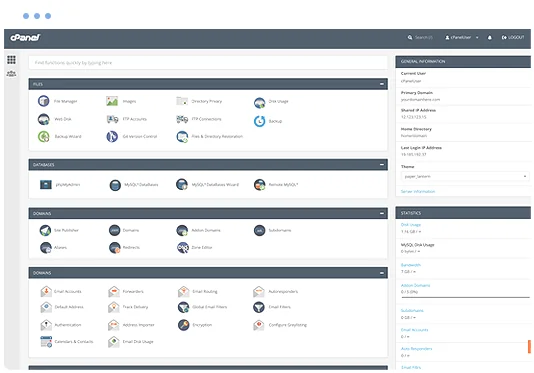
cPanel hosting control panel

What is Joomla?

Joomla is a free, open-source content management system (CMS) that has powered websites since 2005. It sits between a simple website builder and a full development framework: editors get a familiar dashboard for pages, articles and menus, while developers get a structured platform they can extend with components, modules and plugins.

Where Joomla stands out is what comes in the box. Multilingual content, detailed user permissions, custom fields, content workflows and built-in site search are all part of the core, so many sites that would need a stack of plugins on other platforms can run on Joomla with very few extensions. That makes it a popular choice for organisations, clubs, schools, councils and businesses that need more structure than WordPress offers but less complexity than Drupal.

Joomla features

What you get when you run Joomla on Hoopla Hosting.

Multilingual out of the box

Publish your site in multiple languages without third-party plugins. Joomla links translated articles, menus and modules so visitors can switch languages from any page.

Users, groups and access levels

Create as many user groups and viewing levels as you need, then control exactly who can see, create, edit or publish each piece of content. Ideal for membership areas and multi-author sites.

Custom fields and workflows

Add your own fields to articles, users and contacts, and use workflows to send content through review and approval before it goes live.

Extensions and templates

The Joomla Extensions Directory lists thousands of add-ons for forms, ecommerce, events, galleries and more, and child templates let you customise a design without losing updates.

SEO-friendly by default

Search-engine friendly URLs, page titles, meta descriptions and redirects are managed from the admin panel, and Smart Search gives visitors fast on-site search.

Built-in security and updates

Two-factor authentication, password policies and one-click core updates are included. Joomla's security team publishes regular releases, which Softaculous can apply for you.

What can you build with Joomla?

Organisation and community websites

Clubs, associations and not-for-profits use Joomla to run news, events and member-only areas from one site.

Multilingual business sites

Businesses that serve customers in more than one language can manage every translation from a single install.

Intranets and portals

User groups and access levels make Joomla a good fit for staff portals, document libraries and partner extranets.

Education and local government

Schools and councils use Joomla for content-heavy sites with many editors and an approval process.

Softaculous one-click application installer

Why host Joomla with Hoopla?

Install Joomla in a few clicks with Softaculous in cPanel, then keep it running on fast, secure New Zealand hosting backed by a local support team.

  • One-click install and updates with Softaculous
  • Staging copies to test changes safely
  • Daily backups with JetBackup
  • Free SSL certificates
  • LiteSpeed web server and SSD storage
  • Web application firewall
  • Auckland infrastructure and 24/7 support
  • Free migration from your current host
FREE MIGRATION

Joomla hosting requirements

Joomla runs on PHP and MySQL/MariaDB, both included with every Hoopla cPanel plan, and you can choose the PHP version your site needs from cPanel. Most Joomla sites run comfortably on our web hosting plans. If your site has many extensions, lots of logged-in users or high traffic, Business Hosting gives you more resources and room to grow.

Recommended: Web Hosting

$5.17+GST5.95incl. GST/month

Starting price, plus room to upgrade as your Joomla site grows.

Prices are in NZD and exclude GST.
COMPARE PLANS

Not sure what you need? Ask our team.

Getting started with Joomla

  1. Order a Web Hosting plan, or log in to your existing Hoopla cPanel account.
  2. Open Softaculous Apps Installer in cPanel and search for Joomla.
  3. Choose the domain to install on, set your admin username, password and email, then click Install.
  4. Log in to the Joomla administrator at yourdomain/administrator and complete the post-installation messages.
  5. Choose or install a template, then create your menus, categories and first articles.
  6. Turn on search-engine friendly URLs in Global Configuration and set up two-factor authentication for your admin account.

Joomla Hosting FAQs

Can I install Joomla with one click?

Yes. Joomla is available in Softaculous in your cPanel account. Choose the domain, set an admin username and password, and Softaculous creates the database and installs the site for you.

Can you move my existing Joomla site to Hoopla?

Yes. Migration assistance is included with our hosting plans, and our team can help move your Joomla files, database and email from your current provider.

Which plan do I need for Joomla?

Most Joomla sites run well on our cPanel web hosting plans. Larger sites with many extensions or high traffic may suit Business Hosting.

How do I keep Joomla up to date?

You can update Joomla from its own administrator dashboard or from Softaculous in cPanel. Softaculous can also be set to update installations automatically, and our daily backups give you a restore point if anything goes wrong.

Is Joomla better than WordPress?

It depends on the site. WordPress is simpler for blogs and small business sites and has a larger plugin library. Joomla includes more advanced features, such as multilingual content and detailed access control, without extra plugins. Both can be installed from Softaculous, so you can try each on a subdomain.

Can I test changes before they go live?

Yes. Softaculous can create a staging copy of your Joomla site, so you can try new extensions or templates and push the changes live when you are happy.

Ready to launch Joomla?

Choose a plan, or contact our team and we can help you pick the right one.