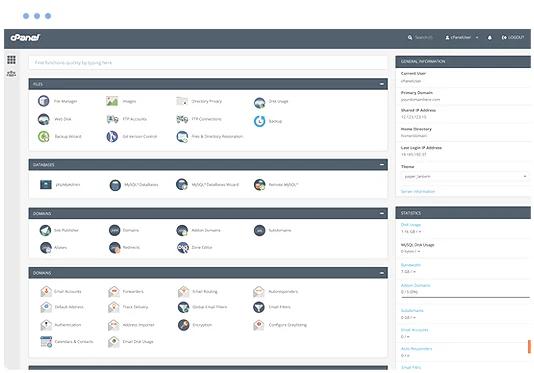
• Manage domains
  • Launch databases
  • Publish a website
cPanel hosting control panel

Xibo Web Hosting

Run Xibo on a managed cPanel hosting platform with the tools needed to manage your website, email, databases and SSL.

  • Xibo Compatible
  • Multiple Website Support
  • Unlimited Email Accounts
  • Web Application Firewall
  • SSL Certificates Included
  • Easily install Xibo
  • cPanel control panel
  • 24/7 Support Helpdesk
Softaculous one-click application installer

Application installs with Softaculous

Softaculous lets you install and manage supported applications through cPanel, including Xibo and other cms scripts such as Bludit, Joomla, Open Real Estate, SofaWiki, MODX, Zikula, PluXml, Croogo, Tiki Wiki CMS Groupware 24 and e107.

Install or manage supported applications from your hosting control panel without a manual setup process.

Web Hosting Pricing from $12.0405 Per Month


VIEW ALL PACKAGES

Xibo hosting features

Xibo CMS is a PHP/MySQL web application which can run on Windows/Mac or Linux

Xibo 0 Xibo 1 Xibo 2
Xibo 3 Xibo 4

The Benefits of Xibo Hosting

  • Create your Content : Easily layout your content and add live information from the web using Xibo's Widgets. Thereââ?¬â?¢s no limit to the number of screen designs you can build using the simple drag and drop designer, which offers a wide range of media support. Integrate third party content such as current weather, traffic, RSS feeds, streaming video, or web sites, and mix them in with your own to create a seamless design.
  • Schedule to your Screens : Using the Xibo calendar you can schedule your creations to your screens. Choose from simple or advanced scheduling with always on, repeating and dayparting capabilities. Schedule with a click of a button; what you want, where and when you want it. Make scheduling even easier by organising your Layouts into Campaigns, or throw up a design right after youââ?¬â?¢ve finished it with Schedule Now.
  • Manage your Network : Make sure your message is being received. Monitor your network of screens and see the status of each one, check proof of play data and view diagnostic information. Keep things running smoothly, straight from your web browser. Use Display Groups to organise your network into logical sections, which can be nested or created automatically from a search query, to help you get the right content to the right screens with minimal effort.

Explore related applications