



WHM - Web Host Manager | Reseller Howto - Manage and use a reseller hosting account with WHM
Just starting with Hoopla's Reseller Hosting? Want to know how to use a reseller account and what a reseller account does?
Let's check out the basics of WHM:
What does WHM do?
- Web Host Manager ( WHM ) enables you to manage multiple cPanel accounts. Each cPanel account can hold a number of websites/domains/email accounts.
- WHM enables you to manage other aspects of your reseller account e.g Packages.
- Control, Manage, Suspend any cPanel account.
- Login to any cPanel account without username/login.
Creating cPanel Accounts:
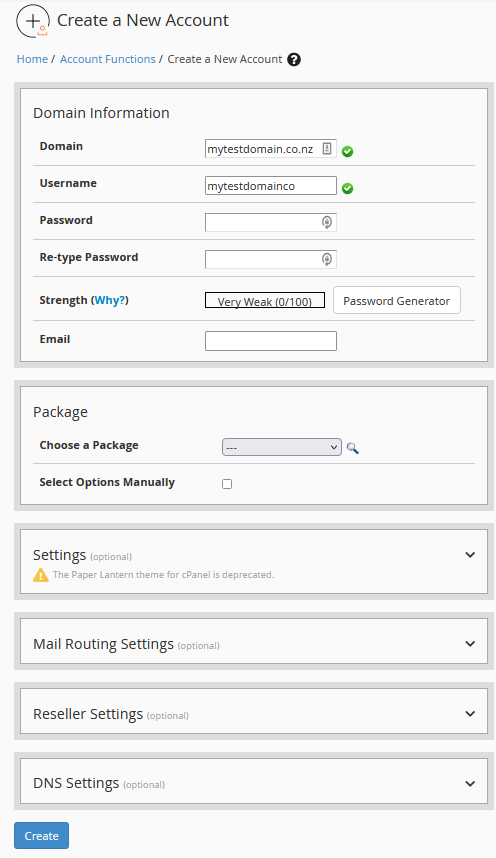
When creating a new cPanel account for your websites, you must have a package to assign to the account first. Create a package before creating your first cPanel account.
Simple Steps:
Enter the required information, then click Create.
The cPanel account is then created.
What are packages?
Packages define the following:
- Disk space
- Bandwidth
- Email Accounts
- Mailing Lists
- MySQL Databases
- Max Subdomains
- Max Parked Domains
- Max Addon Domains
- Max Passenger Applications
- Maximum hourly email by domain relayed
- Maximum percentage of failed or deferred messages a domain may send per hour
- Max Quota per email address.
Creating a package:
Clicking Add a package in WHM you can start adding a package.
Take note of the following when creating a package:
- High quotas may effect your reseller account if accounts use high amounts of disk space
- Default settings aside from Disk, Bandwidth will work all OK.
The intended function of packages is to create for example three different plans; Small, medium and large.
Each package accommodating your different clients needs.
Logging into cPanel accounts from WHM:
- Click on List Accounts in your WHM.
- Choose which account you want to login to, click on the cPanel logo icon - This will open the cPanel account instantly without required login.
Modifying DNS Zones:
You can modify any DNS Zone across all domains hosted within your WHM via DNS Zone Editor accessible from your WHM Menu.
